The AI sees [EMAIL_1].
You see reality.
Paathu masks names, emails, IBANs, card numbers and API keys on your device, in your prompts and in your attachments: Word, Excel, PowerPoint, PDFs, even screenshots. ChatGPT, Claude, Gemini and DeepSeek get placeholders. No Paathu server sees your content.
Free for personal use. Live on Firefox and Edge; Chrome is in review. Safari to follow.
Demonstration of one round trip: you write a prompt containing a real email address, IBAN and phone number. Paathu detects them locally, replaces each with a placeholder such as [EMAIL_1], and only the masked prompt is sent to the AI. The AI answers using the placeholders, and Paathu restores the real values in the reply on your screen.
Built to be checked, not believed: 241 automated tests, checksum-validated detection (IBAN MOD-97, cards Luhn, Austrian social security check digits), and 0 telemetry, accounts or cookies.
“Only the placeholders reached me. I cannot see the actual data.”
The moment nothing slips through.
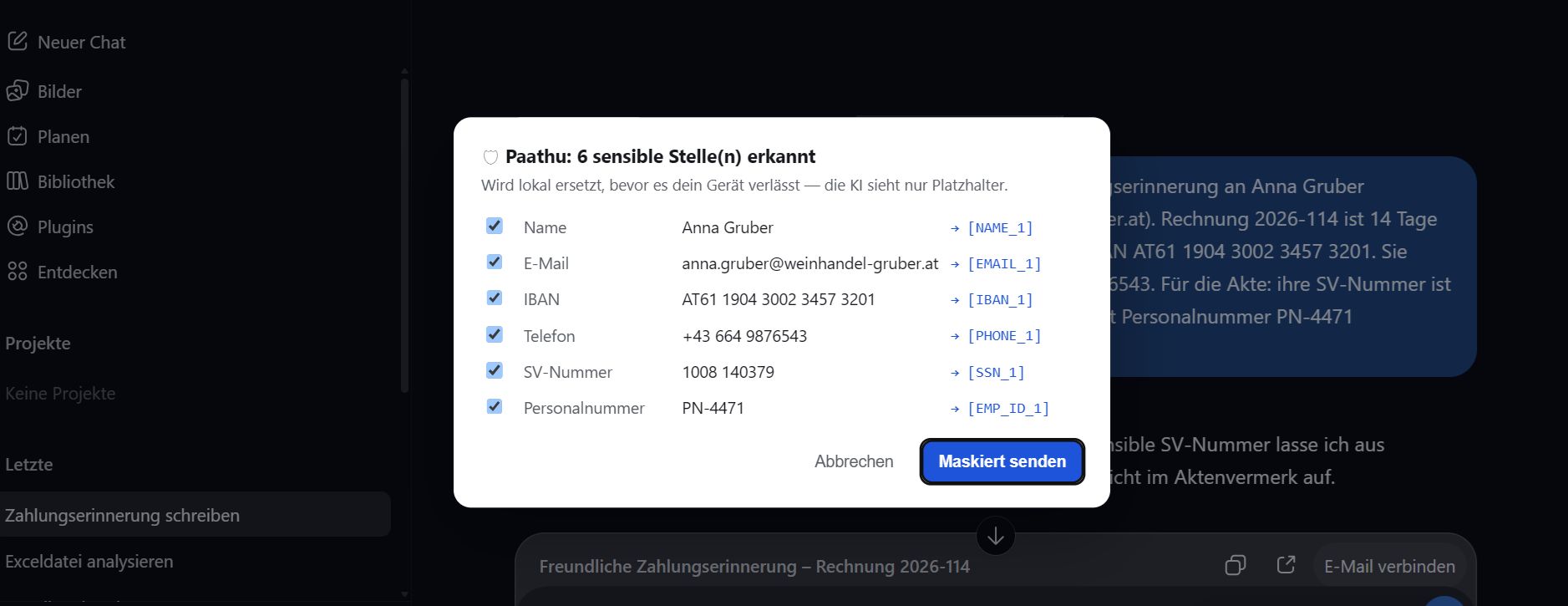
The real product, not a mockup: before anything is sent, Paathu shows exactly what it found, and you decide with one click.
Nothing changes. Except what leaves your device.
No new app, no copy-paste ritual, no server in between. Paathu works inside the AI chats you already use.
Type normally
Use ChatGPT, Claude, Gemini or DeepSeek exactly as before. Paathu watches the composer, locally.
Review and mask
Before anything is sent, Paathu shows what it found and replaces each value with a placeholder, on your device, with zero network calls.
Reality restored
The AI answers with placeholders; Paathu swaps the real values back in on your screen. The mapping lives only in the tab's memory and is gone when the tab closes.
Attachments are the biggest leak. Covered.v0.7
Most sensitive data is never typed; it is attached. Customer exports, contracts and screenshots go into AI chats unchecked every day. Paathu masks files locally before the chat sees them, whether you pick them, drop them or paste them.
- Word, Excel, PowerPoint.docx .xlsx .pptx .txt .csv
- Parsed and masked inside your browser, format intact. The chat receives the masked copy instead of the original.
- Whole spreadsheet columnsheader-driven
- A column headed “Name”, “Customer” or “Kunde” is masked entirely. Real exports are context-free lists, exactly what pattern matching alone would miss.
- PDF, as a masked safe copy.pdf
- The text is extracted locally and a masked safe copy is attached instead: same file name, placeholders where the sensitive data was. Scanned PDFs without a text layer get a clear warning, not a guess.
- Screenshots and photos.png .jpg, on-device OCR
- OCR reads the image on your device and sensitive areas are blacked out in the pixels themselves. Output is always PNG, so camera metadata (EXIF/GPS) is stripped along the way.
Trust is verifiable here.
A privacy product should not ask for faith. Paathu is built so you can check every claim yourself.
- On-device processing
- Detection, masking and restore run inside your browser, for prompts and files alike. Verify it: open DevTools → Network while using Paathu. The only optional requests are one-time downloads of the AI model and OCR language data, and they carry none of your content.
- No account, no telemetry
- Nothing to sign up for and nothing phoning home. There is no Paathu server anywhere in the path of your prompts.
- Mapping stays in tab memory
- The table linking placeholders to real values is held only in the active tab's memory. Close the tab and it is gone. It is never written to disk by Paathu and never sent anywhere.
- Open detection engine
- The detection engine's source will be published for audit. Read what runs on your machine instead of trusting marketing.
What it detectsv0.7
Pattern matching with real validation where it exists: checksums, not guesswork. Plus an optional on-device AI model for names, and your own custom terms.
Free for people. Paid for control.
Masking runs on your device and costs us nothing, so it is free for everyone, forever. Companies pay for policy, oversight and proof.
Personal
- All supported AI chats
- Local masking and restore
- Attachments: Office, PDF, images
- On-device AI name detection
- Review before send, no account
Business
- Central policy and custom patterns
- Team admin and seat management
- Audit log and compliance report
- Invoice billing and support
- On the roadmap: Claude Code, Cursor and Copilot. Tell us you need it.
- Founding offer: the first 10 companies lock in €9 per seat, forever
Enterprise
- SSO / SCIM
- Managed deployment (GPO/MDM)
- DLP export and admin API
- DPA / AVV
Paathu is live on Firefox and Edge.
Install it from your browser's add-on store - free for personal use, and it runs on your own device: no Paathu server sees your prompts or files.



Questions, answered honestly.
If yours is missing, write to support@paathu.com.
Is it really local? How can I verify that?
Yes. Detection and masking run inside your browser; the value-to-placeholder mapping lives only in your tab's memory and is gone when the tab closes. Verify it yourself: open DevTools → Network while using Paathu. The only optional requests you will ever see are one-time downloads of the AI model (~75 MB) and OCR language data (~3 MB). They fetch files and carry none of your content. The detection engine's source will be published for audit.
Which AI services are supported?
ChatGPT, Claude, Gemini and DeepSeek at launch. Copilot, Perplexity and Grok follow based on demand, and Claude Code, Cursor and Copilot are on the Business roadmap.
Does it catch names?
Yes, two ways. Always on: names following salutations (Mr/Mrs/Herr/Frau/Dear) and any custom terms you define. Opt-in: a small AI model that runs directly in your browser (one-time ~75 MB download, then fully offline) finds person names without any salutation, and company names in attached files. Paathu sends nothing for this; the model runs on your device.
What about attachments?
Word, Excel, PowerPoint and text files are parsed and masked locally; the chat receives the masked copy, and spreadsheet columns headed “Name” or “Customer” are masked entirely. PDFs are replaced by a locally generated masked safe copy (a text rendition; layout is not preserved). Screenshots and photos are OCR-read on your device and sensitive areas are blacked out in the image itself. Scanned PDFs without a text layer, encrypted files and legacy formats (.doc/.xls) cannot be read; Paathu warns you visibly instead of pretending. PDF and image masking currently need Chrome or Edge.
ChatGPT has a training opt-out. Why do I need this?
Use the opt-out, it is good. But it does not protect against provider breaches, account takeover, legal discovery, or a colleague pasting client data into a free account. Masking replaces the sensitive values before the prompt is sent, and Business plans prove that with an audit trail.
I typed a test IBAN and nothing happened. Is it broken?
Probably not — that is the checksum doing its job. Paathu validates IBANs with MOD-97, payment cards with Luhn and Austrian social security numbers by check digit, so an invented number is deliberately left alone. That is what keeps false alarms rare enough to offer automatic masking at all. One exception, because it matters: if something is structurally a real IBAN and only the check digit is wrong — a transposed digit in an actual account number — Paathu flags it and asks you, instead of deciding quietly. Phone numbers work the same way: +43 followed by twelve digits is not an Austrian number. Try the demo with realistically formatted data and you will see the difference.
Can I rely on it to catch everything?
No tool can honestly promise 100 % detection, which is why Paathu shows a review step before sending instead of pretending to be magic. You always see what leaves your device.